LearnPTE
Start preparing
FeaturesBlog
Sign Up
Blog/Guides

PTE Describe Image: Complete Guide with Templates & Examples (2025)

August 27, 2025|12 min
LearnPTE Team
PTE Describe Image: Complete Guide with Templates & Examples (2025)

Read summarized version with

Loading content...
Make real PTE progress, faster

Practice for your PTE test with the most comprehensive and easy to use AI platform.

Join 1K+ students
Start now - it's free Illustration
You might also like
PTE Write Essay: Complete Guide with Templates & Strategies (2025)

PTE Write Essay: Complete Guide with Templates & Strategies (2025)

Comprehensive guide with sample prompts and responses covering strategies and templates for preparing for PTE's Write Essay task.

By LearnPTE Team•18 min
Nov 06, 2025
PTE Retell Lecture: Complete guide with note-taking templates & examples (2025)

PTE Retell Lecture: Complete guide with note-taking templates & examples (2025)

Comprehensive guide with sample lectures and responses covering strategies and templates for preparing for PTE's Retell Lecture task.

By LearnPTE Team•15 min
Sep 30, 2025
Preparing for PTE's new Summarize Group Discussion task

Preparing for PTE's new Summarize Group Discussion task

Comprehensive guide with sample task and responses covering strategies for preparing for PTE's new Summarize Group Discussion task.

By LearnPTE Team•15 min
Aug 13, 2025

LearnPTE is the smarter way to prepare for PTE. Practice real questions, get instant AI feedback, and improve faster with personalised insights.

© 2025 LearnPTE | Melbourne, Australia

General

  • Home
  • Pricing
  • Contact Us

Resources

  • Features
  • Blogs
  • FAQs

Legal

  • Privacy Policy
  • Terms of Service

The PTE Describe Image is a crucial speaking task where test-takers must describe visual information within 40 seconds. This comprehensive guide covers all image types, proven templates, and scoring strategies to help you achieve your target PTE score.

Try LearnPTE's Describe Image practise module to get precise feedback on pronunciation, fluency, and content accuracy.

What is PTE Describe Image task?

The PTE Describe Image task can feel overwhelming with its 25-second prep time and 40-second response window. But here's the thing: this task tests how well you can discuss pictures like graphs, charts, maps, and photos. Doing well means spotting important details, arranging your thoughts, and speaking clearly and smoothly. Once you understand the format and develop a systematic approach, you'll find it's more manageable than it first appears.

Task format overview

The images can include bar charts, pie charts, line graphs, maps, process diagrams, flowcharts, and pictures of objects, landscapes, or people. There will be a preparation time of 25 seconds to study the image before the recorder opens to record the test taker's response. The task evaluates your ability to quickly interpret visual information and express it clearly within strict time constraints, in:

  • 25 seconds preparation: Study the image and organize your thoughts
  • 40 seconds response: Deliver your description
  • Goal: Provide clear, structured description of key features

With systematic practice and the right strategies, the PTE Describe Image task transforms from intimidating to achievable—mastering this skill can significantly boost your Speaking score.

Simple strategy that works

Regardless of image type, follow this three-step approach adapted from official PTE guidelines:

Step 1: Identify and introduce (5-8 seconds)

During preparation, use the time efficiently to study the image and identify the main features that can be defined by answering questions such as, What is happening? What are the smallest numbers? and What are the biggest numbers?

Start your response by introducing the image:

  • "This graph shows/displays..."
  • "The diagram illustrates..."
  • "This image depicts..."

Step 2: Describe key features (25-30 seconds)

In the body, students should describe each feature or main idea as identified in Step 1, and provide supporting details. Focus on the three most significant elements - typically the highest, lowest, and one other notable feature.

Step 3: Conclude (5-7 seconds)

They should conclude with one sentence summarizing their description and drawing the relevant conclusion, e.g., The information indicates…, From the chart/graph, we can conclude that…

Strategies by image type

The following are the most common question types for the PTE describe image task. Let's discuss each of them in detail with examples:

Bar Charts and Column Charts

Bar charts are excellent for practicing because they provide all of the factors clearly and logically. These factors include the topic, figures, differences or similarities and so on.

Template Structure:
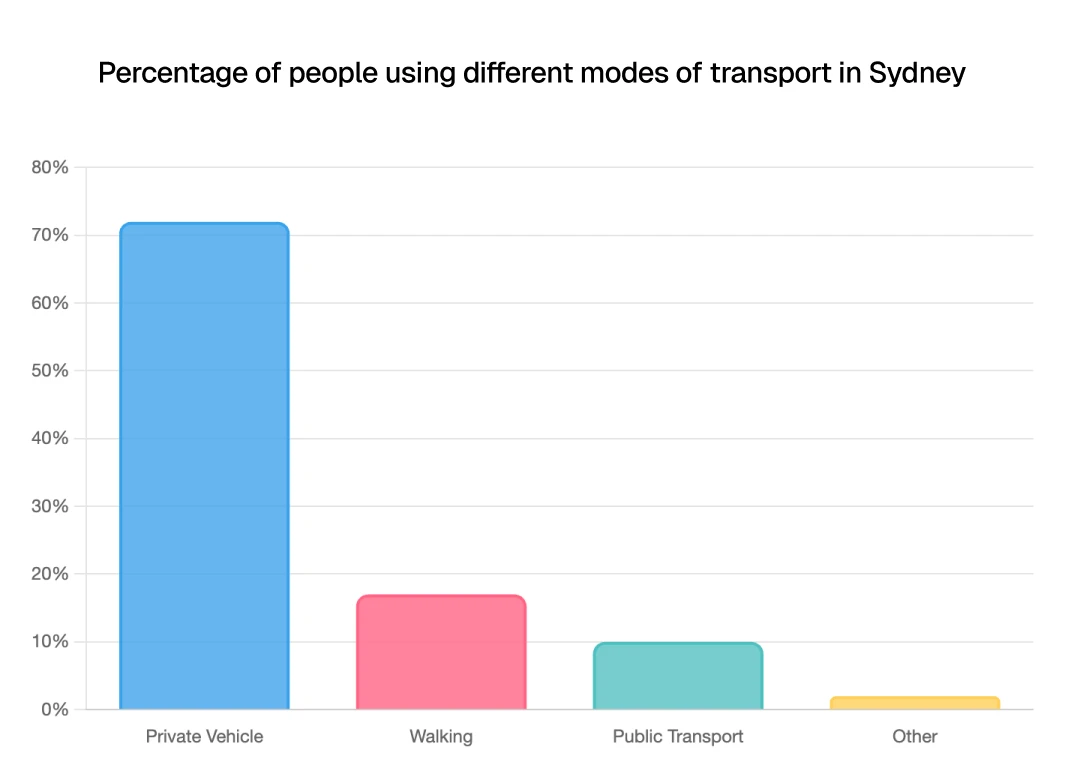
  • Introduction: "The bar chart represents information about [topic]"
  • Key Features: "The highest figure is [value] for [category], followed by [second highest]. However, the lowest figure is [value] for [category]"
  • Conclusion: "In conclusion, it can be seen that [main trend/difference]"

Shows a bar graph.

Example Response (Click to reveal)
This bar chart shows transport preferences for trips in Sydney. The chart reveals that 72% of people preferred their vehicles, followed by 17% who chose to walk to reach their destination. Public transportation like trains, buses, and ferries was used by 10% of individuals, and only 2% chose other forms of transportation. Overall, we can conclude that people in Sydney find much more comfort in traveling in their vehicles compared to other conveyances.

Get fluency and pronunciation feedback on Bar Charts

Create account

Line Graphs

Before tackling line charts, know that there are 3 basic types in PTE Describe Image: single line, parallel line, and cross line charts. The most significant part is describing these trends clearly.

Key Vocabulary for Trends:

  • Upward movement: increased, rose, grew, went up, climbed, surged
  • Downward movement: decreased, declined, dropped, fell, plummeted, dipped
  • No change: remained steady, stabilized, plateaued, stayed constant
  • Degree of change: sharply, gradually, slightly, dramatically, moderately

Template Structure:

  • Introduction: "The line chart describes information about [topic]"
  • Trends: "The highest figure in [category] is [value], and it gradually [increased/decreased] to reach [value]. In contrast, the lowest figure is [value] and it [trend description]"
  • Conclusion: "In conclusion, [overall trend] can be observed"

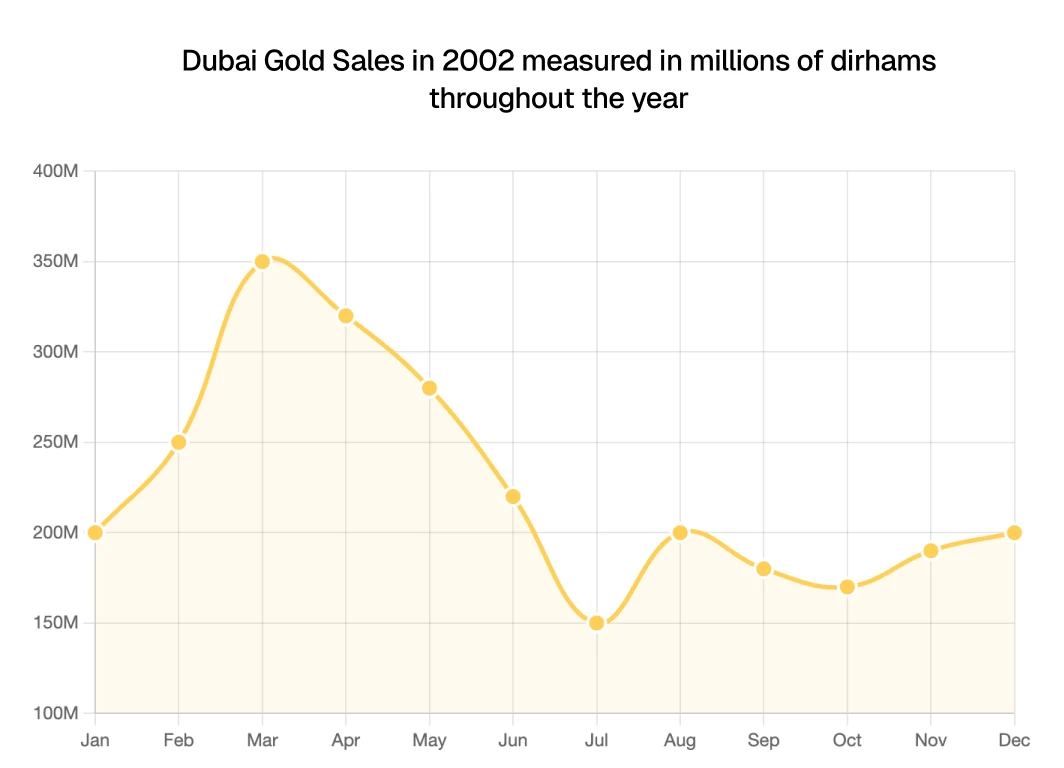
Shows a line graph.

Example Response (Click to reveal)
This line graph shows Dubai Gold Sales in 2002 measured in millions of dirhams. Sales started at 200 million in January, peaked at 350 million in March, then declined to the lowest point of 150 million in July. After August's recovery to 200 million, sales fluctuated and returned to 200 million by December. Overall, despite monthly variations, sales averaged around 200 million dirhams throughout the year.

Get fluency and pronunciation feedback on Line Graphs

Create account

Pie Charts

Pie charts are among the most challenging PTE charts to explain, as every slice represents a specific value. The pie charts show the overall composition out of 100% and will always have colors to highlight the different items.

Template Structure:
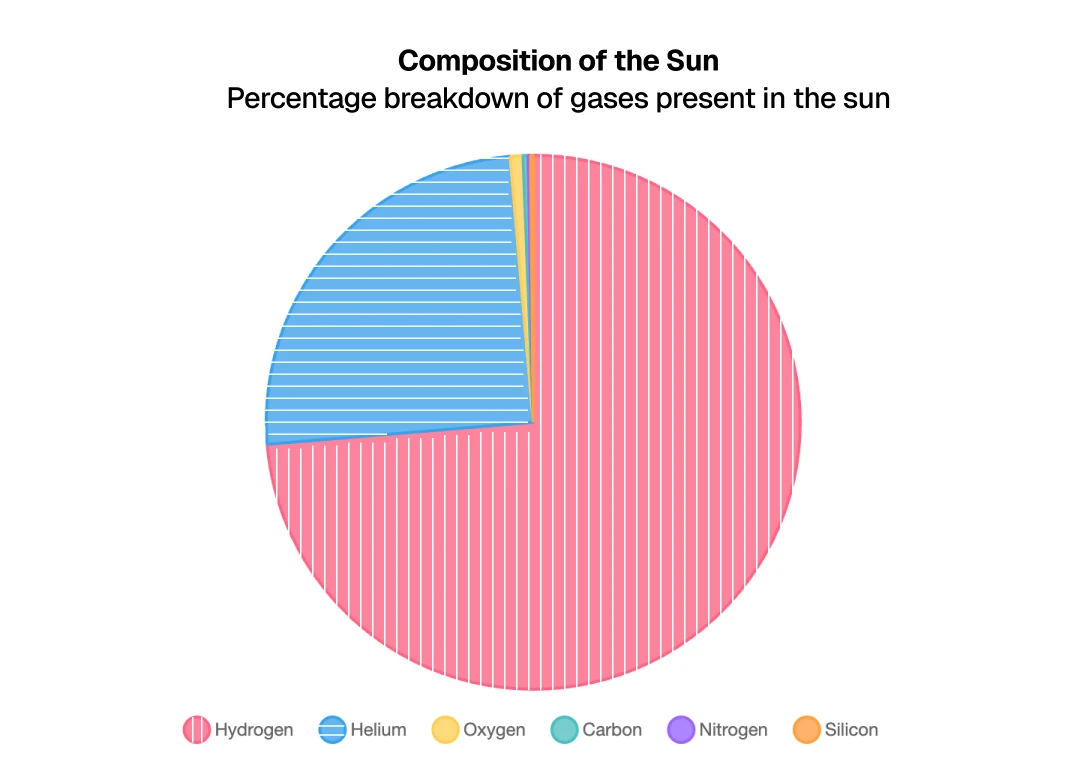
  • Introduction: "The pie chart shows the percentage breakdown of [topic]"
  • Segments: "The largest segment is [category] with [percentage], followed by [second largest]. The smallest portion is [category] at [percentage]"
  • Conclusion: "Overall, [main observation about the composition]"

Shows a pie chart graph.

Example Response (Click to reveal)
The pie chart shows the percentage of components the sun comprises. It can be seen that the highest percentage of gas present in the sun is hydrogen at 73.5%, followed by helium at 24.9%. Also, very small percentages of nitrogen, carbon, oxygen, and silicon are present in the sun, totaling less than 2%. Overall, it can be said that the sun is composed primarily of hydrogen and helium.

Get fluency and pronunciation feedback on Pie Charts

Create account

Tables

For tables, summarize the key information by highest and lowest values, trends across the table, and any significant figures. Don't try to mention every number.

Focus Areas:

  • Column and row headers to understand what's being compared
  • Highest and lowest values
  • Any clear patterns or trends
  • Notable differences between categories

Template Structure:

  • Introduction: "The table presents data about [topic] across [categories/time periods]"
  • Key Comparisons: "[Category 1] shows [trend/value] while [Category 2] demonstrates [contrasting information]"
  • Conclusion: "The data highlights [main pattern/difference]"

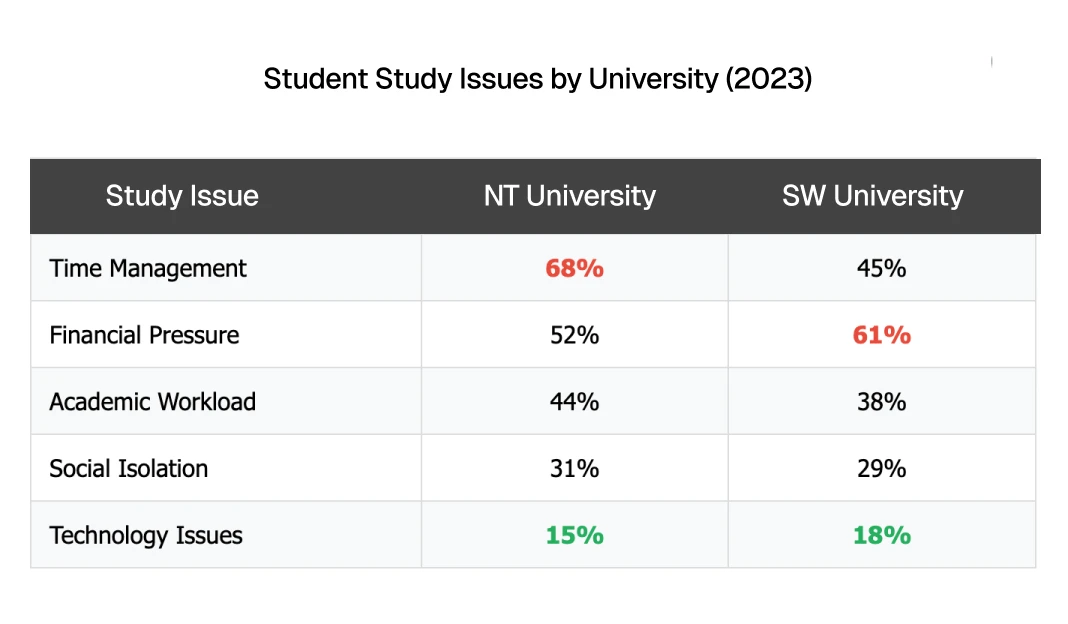
Shows a table.

Example Response (Click to reveal)
The table shows student study issues at two universities in 2023. University A's biggest problem is time management at 68%, while University B struggles most with financial pressure at 61%. Academic workload affects around 40% at both universities. Social isolation impacts about 30% of students at each institution. Technology issues are the lowest concern, affecting only 15-18% of students. The data reveals different priority challenges between the universities.

Get fluency and pronunciation feedback on Tables

Create account

Process Diagrams and Flow Charts

Process chart PTE involves explaining a sequence of steps in a structured manner. This task can be challenging due to the limited 40-second time frame especially when there are numerous steps involved.

Essential Vocabulary:

  • Sequence words: initially, first, next, then, subsequently, finally, ultimately
  • Process words: develops, converts, transforms, turns into, produces, generates
  • Connection phrases: this is followed by, after that, in the next stage, leading to

Template Structure:

  • Introduction: "The flowchart illustrates the process of [topic]"
  • Steps: "Initially, [first step]. This is followed by [second step]. Subsequently, [third step]"
  • Conclusion: "Finally, [final step], completing the [process name]"

Adaptation Strategy: The core part to complete this type of task is cutting off or adding more details from the provided flow chart. If there are many steps, group them or focus on major stages. If few steps, add more descriptive detail.
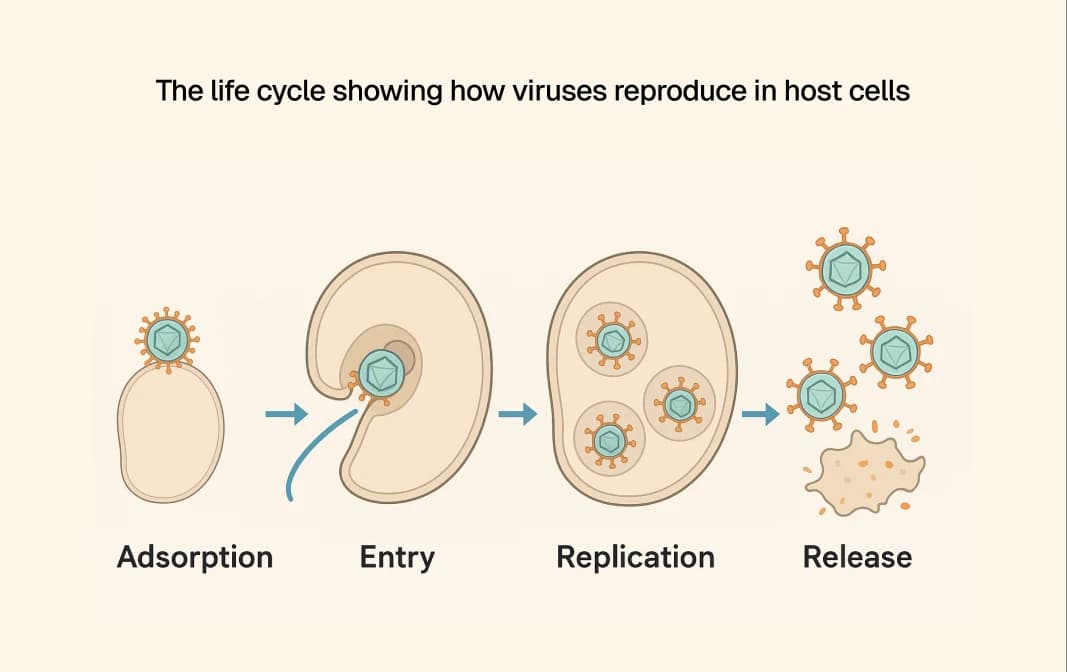
Shows a virus lifecycle diagram.

Example Response (Click to reveal)
The flow chart describes the reproduction process of virus. It can be seen that the first step is adsorption. This is followed by the second step in which the virus enters the host cell. After that, the virus replicates and assembles itself in the cell. In the final step, the cell is disintegrated and viruses are released. After analyzing the key aspects, it can be concluded that the flow chart shows crucial information about how viruses reproduce.

Get fluency and pronunciation feedback on Process Diagrams

Create account

Maps

When describing maps, focus on:

  • Geographical features: locations, directions, landmarks, borders
  • Spatial relationships: north/south/east/west, adjacent to, located between
  • Key elements: major cities, routes, migration patterns, notable features
  • Scale and scope: regional, national, or global perspective

Template Structure:

  • Introduction: "This map shows [geographical area/theme]"
  • Key Features: "The map indicates [major features/patterns]. Notable locations include [specific places]"
  • Relationships: "The [routes/patterns] connect [locations] showing [purpose/movement]"
  • Conclusion: "Overall, the map demonstrates [main geographical relationship/pattern]"

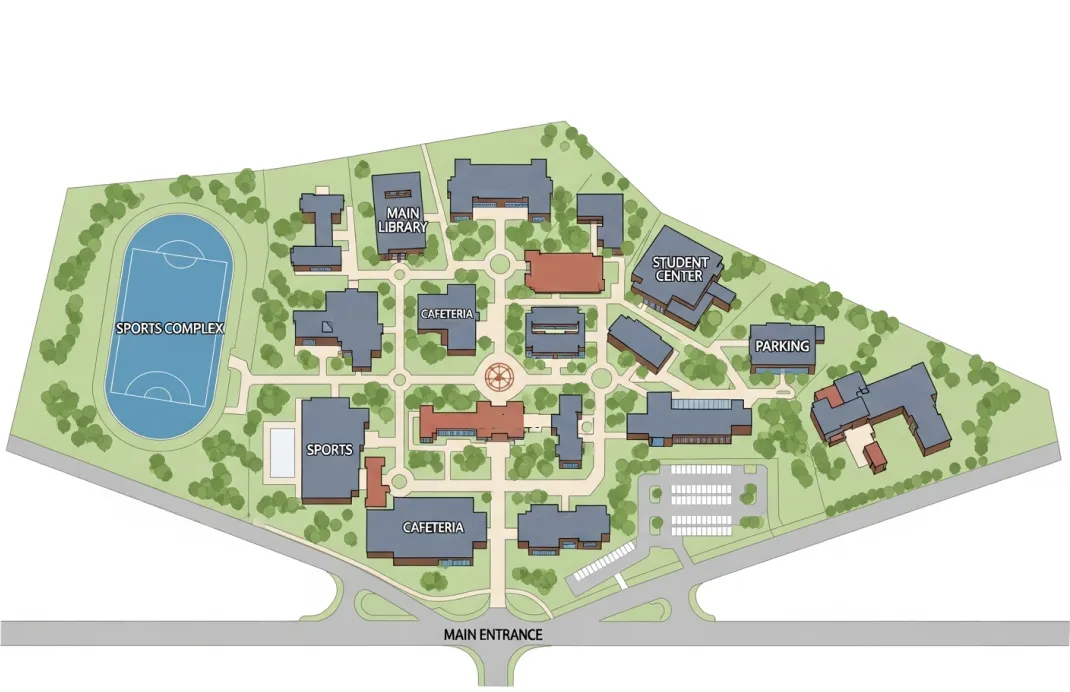
Shows a university campus map for PTE describe image.

Example Response (Click to reveal)
This map shows a university campus layout. The main library is in the north, with the student center on the east side. The sports complex occupies the southwest area, while the cafeteria sits centrally. The parking area is located southeast, and the main entrance is at the southern boundary. Overall, the facilities are well-distributed across the campus for easy student access.

Get fluency and pronunciation feedback on Maps

Create account

Pictures and Photographs

When describing pictures and photographs, you need to use different vocabulary compared to charts and graphs. Focus on these key areas:

Useful Vocabulary:

  • Perspective: bird's eye view, worm's eye view, from a distance, close-up view
  • Structure: foreground, background, upper/lower part, left/right side, in front of, behind, next to
  • Scene description: shows a scene, depicts, illustrates, captures, displays an image of
  • Impression: attention focused on, draws the eye to, emphasizes
  • Intention: evokes, expresses something, puts forth a perspective

Template Structure:

  • Introduction: "This photograph/image shows [scene/subject] from [perspective]"
  • Structure: "In the foreground, we can see [elements]. The background shows [elements]"
  • Key Details: "The image captures [main focus/activity]. Notable features include [specific details]"
  • Conclusion: "Overall, the photograph conveys [impression/message]"

Shows an image of a library for PTE describe image.

Example Response (Click to reveal)
This image shows a modern library interior. In the foreground, students work at wooden study tables with laptops. Tall bookshelves filled with colorful books line both sides of the room. Large windows in the background provide natural lighting, creating a bright atmosphere. Modern light fixtures illuminate the ceiling. Overall, the space represents a contemporary learning environment designed for both individual study and collaboration.

Get fluency and pronunciation feedback on Photographs

Create account

Critical Success Tips

Time Management Strategy

You will get 40 seconds to describe each image. Before this, there will be a countdown of 25 seconds. After this countdown only, your microphone will open up. So, never start answering before the microphone opens. Also, speaking once the allotted time is over is of no use. So, try to finish your response in 35 seconds.

Mastering time management is crucial—use your 25 seconds wisely to identify key features, and deliver your response confidently within the 35-second sweet spot for maximum scoring potential.

Need timing practice? Our practice tool includes a built-in timer that mimics the real test—25 seconds prep, 40 seconds response.

Content Strategy for High Scores

Including around 12 items from the image in your response is enough to get the full score in the Content category. Focus on quality over quantity - describe main features accurately rather than listing every detail.

Statistical Vocabulary Mastery

It is important to use correct vocabulary to describe statistical information. Build your repertoire of:

  • Prepositions: from/between 1990 to/and 2010, during the period of
  • Movements up: increased, rose, grew, went up, climbed, surged
  • Movements down: decreased, declined, dropped, went down, fell, plummeted
  • Adjectives: slight, gradual, sharp, sudden, steady, dramatic
  • Adverbs: slightly, gradually, sharply, suddenly, steadily, dramatically

Common Mistakes to Avoid

Don'ts ❌

  • Don't try to mention every single detail
  • Don't spend too much time on minor elements
  • Don't use memorized templates rigidly - relying too heavily on them can make your answer sound rehearsed and may not fit all image types
  • Don't panic if you miss something - keep flowing
  • Don't exceed the time limit
  • Don't start speaking before the microphone opens
  • Don't use filler words excessively (um, ah, like)

Speaking Quality Focus

Remember that in this task, you will be assessed on three criteria: pronunciation, fluency, and content. So, do not worry too much about grammar, but be sure to mention the main elements, ideas, or features in the image.

Scoring Breakdown

The task contributes 15 marks total to your Speaking score:

CriterionScore RangeKey Focus Areas
Content0-6Accuracy, completeness, key features, relationships between elements
Pronunciation0-5Clarity, word stress, consonant sounds, native-like delivery
Oral Fluency0-5Rhythm, phrasing, smooth delivery, natural speech flow

Content Scoring Details: A high score (6) is awarded to answers that cover all relevant parts of the image, including their relationships. The more elements from the image you describe accurately, the higher your score will be.


Frequently Asked Questions

How long do I have for PTE Describe Image?

You get 25 seconds to study the image and 40 seconds to respond. The microphone opens automatically after the preparation time.

What types of images appear in PTE Describe Image?

Bar charts, pie charts, line graphs, tables, process diagrams, flowcharts, maps, photographs, and sometimes mixed chart types.

How is PTE Describe Image scored?

Based on three criteria: Content (6 marks), Pronunciation (5 marks), and Oral Fluency (5 marks), for a total of 15 marks contributing to your Speaking score.

Can I use templates for PTE Describe Image?

Yes, but adapt them flexibly to each image rather than using rigid memorized responses. Human reviewers are trained to identify overly templated responses.

How many Describe Image questions are in the PTE test?

Typically 6-7 Describe Image tasks appear in the Speaking section of PTE Academic.

What if I can't understand the image completely?

Focus on what you can clearly see and describe those elements confidently. It's better to describe fewer elements accurately than to guess incorrectly.

Should I describe every detail in the image?

No. Focus on the main features and key relationships. Including around 12 relevant items is sufficient for full content marks.

Ready to Master Describe Image?

The key to Describe Image success is developing a systematic approach that works across all image types while maintaining the flexibility to adapt to specific content—practice consistently, and this challenging task becomes your scoring strength.

— LearnPTE

Now that you have the templates and strategies, it's time to practice. Our Describe Image practice module provides:

  • Instant Feedback: Detailed analysis of your pronunciation, fluency, and content accuracy
  • Diverse Image Types: Practice with bar charts, line graphs, pie charts, maps, process diagrams, and more
  • Real Test Conditions: 25-second prep time and 40-second response timer
  • Score Breakdown: See exactly where you're excelling and where to improve

The key to success in Describe Image is developing a systematic approach that works across all image types while maintaining the flexibility to adapt to specific content. While this task might appear challenging initially, with consistent practice and strategic preparation, you'll transform this challenging task into a confident, high-scoring opportunity.